SIP trunk features - For telephony in Switzerland
Discover the revolutionary features of the Virtual-Call SIP trunk
A business SIP Trunk should let you modernise voice connectivity without replacing a phone system that still meets your requirements. The right setup depends on your existing PBX, business numbers, call capacity and routing requirements.
Virtual-Call SIP Trunk combines flexible concurrent channels, number portability, PBX interoperability, Microsoft Teams Direct Routing, monitoring, and business continuity features for production telephony environments.
Start with the infrastructure you already operate and adapt connectivity around your actual telephony requirements.
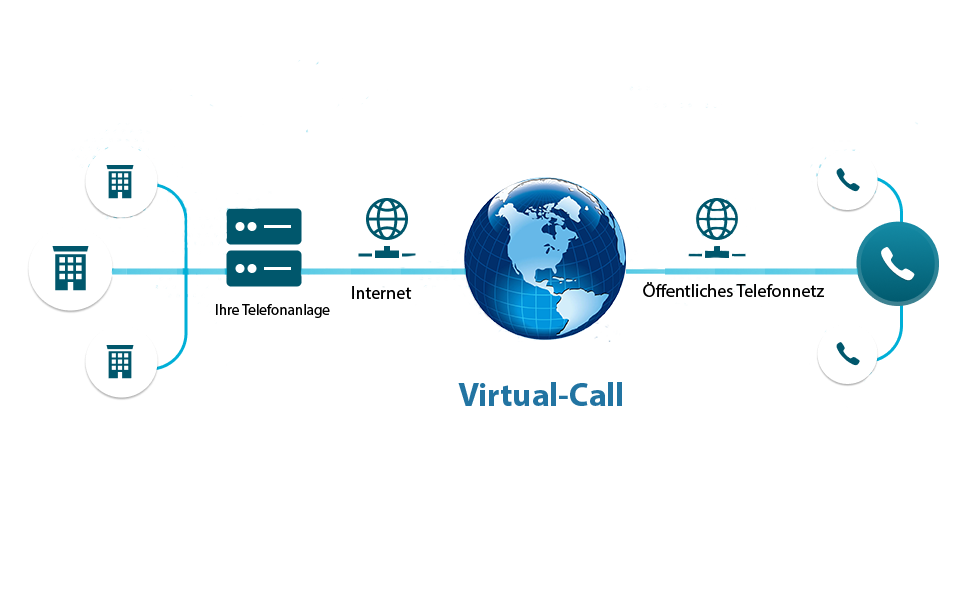
Connect a compatible existing PBX, SBC or voice gateway to modern PSTN connectivity without automatically migrating users, extensions, and call routing to a new phone system.
Configure capacity around the number of simultaneous calls your business actually needs and increase it as call volumes or locations grow.
Keep existing business numbers when porting is available, reducing disruption for customers and employees during migration.

If your organisation already uses Microsoft Teams, Direct Routing can connect Teams users to business telephony through Virtual-Call SIP Trunk connectivity. Employees can make and receive external calls within the Microsoft Teams environment they already use for collaboration.
Call capacity and Microsoft Teams Phone licensing can be dimensioned separately, allowing IT to design the setup around the actual number of users and concurrent calls.
A SIP Trunk connects an IP-based business phone system to the public telephone network using SIP. It modernises voice connectivity while allowing a compatible existing PBX to remain in use.
For IT teams, this means connectivity, call capacity, and numbering can be changed without automatically replacing the complete phone system.
VIRTUAL-CALL SIP TRUNK
Add or adjust concurrent call channels as business requirements, call volumes, or locations change.
Keep existing business numbers when porting is supported to reduce disruption during migration.
Connect supported IP PBX, SBC, and voice gateway environments instead of rebuilding the complete phone system.
Extend SIP connectivity to Microsoft Teams when Teams is part of your business telephony environment.
Support emergency calling through the appropriate local SIP Trunk configuration and correctly registered numbers.
Use alternative routing options to reduce the impact of connectivity disruptions on business calls.
Route business calls through carrier connectivity designed for production voice traffic.
Reduce dependence on a single infrastructure location through geographically distributed SIP resources.
Combine redundancy and routing mechanisms to reduce the operational impact of service disruptions.
Use established carrier connectivity for local and international business telephony requirements.
Monitor SIP Trunk connectivity continuously so service issues can be identified and addressed more quickly.
Protect SIP connectivity through controlled configuration and security measures appropriate to the deployed environment.
Your SIP Trunk should fit the telephony environment your organisation already operates. Virtual-Call supports integration with established IP PBX and collaboration platforms, helping IT teams modernise connectivity without unnecessarily replacing existing systems.
Supported environments include platforms such as Agfeo, Starface, SwyxWare und SwyxON, Unify-Mitel, Yeastar and LiveAgent.
Compatibility should be confirmed for the specific system and configuration before implementation.














SIP Trunk is particularly useful when your current PBX still meets your operational requirements but its connection to the telephone network needs to be modernised.
Instead of migrating users, extensions and call flows to an entirely new phone system, IT can retain the existing environment and modernise PSTN connectivity around it. Capacity, numbering and routing can then be configured according to business requirements.
Before migration, compatibility and routing requirements should be validated against the actual PBX, SBC or voice gateway configuration.
Tell us which PBX or voice gateway you use, the business numbers you need, and your expected concurrent call capacity. We’ll review the technical requirements and prepare the appropriate SIP Trunk proposal for your setup.

Copyright © 2013 - 2026. Virtual-Call GmbH All Rights Reserved.